Wednesday, 10 July 2024

AWS Cloud Practitioner — Top 50 Must-Know Points (CLF-C02)

✅ AWS Cloud Practitioner — Top 25 Must-Know Points (CLF-C02)

(Official exam weightage-based topics)

  1. IAM (Identity & Access Management) – AWS permissions, users, groups, roles, MFA, least privilege.
  2. EC2 (Elastic Compute Cloud) – Virtual servers, pricing (On-Demand, Reserved, Spot), security groups.
  3. Lambda – Serverless compute, event-driven, pay per request.
  4. S3 (Simple Storage Service) – Object storage, 11 9s durability, storage classes, versioning.
  5. S3 Glacier – Archival storage, extremely low-cost, slow retrieval.
  6. EBS (Elastic Block Store) – Block storage for EC2, snapshots.
  7. RDS – Managed SQL databases (MySQL, PostgreSQL, Aurora).
  8. DynamoDB – Serverless NoSQL, millisecond latency.
  9. VPC – Networking: subnets, route tables, NAT, NACLs.
  10. CloudFront – Global CDN, edge caching.
  11. Route 53 – DNS, domain registration, routing policies.
  12. Load Balancers (ELB) – ALB, NLB, CLB.
  13. Auto Scaling – Automatic EC2 scaling.
  14. SQS – Message queue, decoupling apps.
  15. SNS – Push notifications, pub/sub messaging.
  16. EventBridge – Event bus connecting AWS services.
  17. API Gateway – Secure APIs for Lambda & services.
  18. CloudWatch – Metrics, logs, alarms, dashboards.
  19. CloudTrail – API activity logging.
  20. AWS Organizations – Multi-account mgmt, SCPs.
  21. KMS – Encryption key management.
  22. WAF & Shield – Web firewall + DDoS protection.
  23. Cost Explorer – Track & forecast AWS spend.
  24. Trusted Advisor – Best practice checks.
  25. Shared Responsibility Model – AWS vs Customer security roles.

Additional High-Value Exam Topics

  1. AWS Global Infrastructure – Regions, AZs, Edge Locations.
  2. Well-Architected Framework – 5 pillars.
  3. Cloud Adoption Framework (CAF) – Business, People, Governance, Platform, Security, Operations.
  4. AWS Budgets – Budget alerts.
  5. AWS Billing Dashboard – Billing & usage tracking.
  6. Free Tier Types – 12-month, Always free, Trials.
  7. Amazon Cognito – User authentication & identity pools.
  8. AWS Backup – Centralized backup service.
  9. AWS Artifact – Compliance reports.
  10. AWS Service Health Dashboard – Public AWS outages status.
  11. AWS Personal Health Dashboard – Account-specific alerts.
  12. Amazon Lightsail – Simple VPS & hosting.
  13. AWS Outposts – On-prem AWS hardware.
  14. AWS Snowball / Snowmobile – Offline data migration devices.
  15. AWS Storage Gateway – Hybrid storage.
  16. EFS – Serverless Linux file system.
  17. Amazon FSx – High-performance file systems.
  18. AWS Systems Manager – Patch, automation, session mgmt.
  19. AWS Trusted Advisor Categories – Cost, Performance, Fault Tolerance, Security, Service Limits.
  20. AWS IAM Identity Center (SSO) – Central login for AWS accounts.
  21. AWS Marketplace – SaaS, AMIs, software marketplace.
  22. AWS SAM – Serverless app framework.
  23. CloudFormation – Infrastructure as code.
  24. Amazon MQ – Managed message brokers.
  25. AWS X-Ray – Distributed tracing.
  26. AWS Global Accelerator – Improve latency.
  27. Amazon Inspector – Security vulnerability scanning.
  28. AWS Shield Advanced – Enterprise-grade DDoS protection.
  29. Amazon AppStream 2.0 – Stream desktop apps.
  30. Amazon WorkSpaces – Virtual desktops (VDI).

Thursday, 20 June 2024

AWS Cloud Practitioner — Top 55 Must-Know Points (CLF-C02)

56 – 135: Core AWS Services, Security, Networking, Cost & AI

  1. AWS Control Tower – Multi-account setup with guardrails (best practice governance).
  2. AWS Landing Zone – Initial secure enterprise account blueprint (older concept).
  3. Multi-AZ vs Multi-Region – Multi-AZ → high availability | Multi-Region → disaster recovery.
  4. AWS Backup Vault Lock – Prevents backups from being deleted (ransomware protection).
  5. AWS Elastic Disaster Recovery (DRS) – Fast recovery of servers from on-prem/AWS to AWS.
  6. AWS Migration Hub – Central place for migration tracking.
  7. AWS Application Migration Service (MGN) – Lift-and-shift migration tool.
  8. AWS Database Migration Service (DMS) – Move databases between engines (e.g., Oracle → Aurora).
  9. Amazon Aurora Serverless v2 – Auto-scales instantly, SQL-compatible.
  10. Amazon QLDB – Immutable ledger database (tamper-proof log).
  11. Amazon Neptune – Graph database for relationships (social graphs).
  12. Amazon OpenSearch Service – Search, logs, analytics (replacement for Elasticsearch).
  13. AWS Step Functions – Serverless orchestration of Lambda / SQS / APIs.
  14. AWS Batch – Run large batch workloads without managing servers.
  15. AWS Glue – Serverless ETL service for data processing (data catalog).
  16. Amazon Athena – Query S3 data using SQL — serverless analytics.
  17. Amazon QuickSight – Visualization and BI dashboards.
  18. Amazon Kinesis – Real-time data streaming analytics.
  19. Amazon EMR – Big data processing (Spark, Hadoop, Hive).
  20. AWS IQ – Hire certified AWS experts for on-demand work.
  21. AWS CodeCommit – Private Git repositories service.
  22. AWS CodeBuild – Fully managed CI build service.
  23. AWS CodeDeploy – Deploy to EC2, Lambda, on-prem servers.
  24. AWS CodePipeline – Orchestrate CI/CD pipelines.
  25. AWS AppRunner – Easy way to run containerized apps (fully managed).
  26. AWS Elastic Beanstalk – Deploy applications without managing servers (PaaS).
  27. AWS Amplify – Frontend/mobile hosting + backend APIs + Auth.
  28. AWS GameLift – Deploy and scale multiplayer game servers.
  29. AWS IoT Core – Connect and manage IoT devices securely.
  30. AWS Greengrass – Run Lambda + ML on edge (IoT gateway).
  31. IAM Policies – JSON format, Allow/Deny rules, identity-based + resource-based.
  32. IAM Permission Boundaries – Maximum permissions allowed to a user/role.
  33. IAM Access Analyzer – Detects public or cross-account access.
  34. AWS GuardDuty – Threat detection using machine learning.
  35. AWS Macie – Finds & protects sensitive S3 data (PII detection).
  36. AWS Detective – Investigates security incidents using AI.
  37. Security Groups – Stateful firewall for EC2 instances.
  38. NACL (Network ACL) – Stateless VPC security layer.
  39. VPC Peering – Connect VPCs privately (one-to-one).
  40. AWS Transit Gateway – Central hub connecting thousands of VPCs.
  41. VPC Endpoints – Private AWS service connections.
  42. Direct Connect – Dedicated fiber link to AWS.
  43. AWS Certificate Manager (ACM) – Free SSL/TLS certificates.
  44. AWS Secrets Manager – Store & rotate secrets.
  45. AWS Parameter Store – Configuration storage (SSM).
  46. Public vs Private Subnet – Public → IGW | Private → NAT.
  47. Route Tables – Control traffic flow between subnets.
  48. NAT Gateway – Secure internet access for private subnets.
  49. Internet Gateway – Public internet access.
  50. AWS Global Infrastructure Benefits – Fault tolerance, availability, low latency.
  51. Availability Zones Failure Independence – One AZ failure won’t affect others.
  52. Edge Caching in CloudFront – Improves speed, reduces origin load.
  53. S3 Object Lock – Prevents deletion of objects.
  54. MFA Delete – Extra layer for S3 delete protection.
  55. AWS Resilience Hub – Automatic workload resilience evaluation.
  56. AWS Support Plans – Basic, Developer, Business, Enterprise On-Ramp, Enterprise.
  57. Business Plan Features – 24/7 support, full Trusted Advisor, fast response.
  58. Enterprise Support Features – Architect, TAM, concierge billing.
  59. AWS Cost Anomaly Detection – Alerts on unusual usage spikes.
  60. AWS Savings Plans – 1 or 3-year compute commitments.
  61. Compute Savings Plan – EC2 + Lambda + Fargate.
  62. EC2 Instance Savings Plan – EC2 only.
  63. Spot Instances Best Use Cases – Batch & flexible workloads.
  64. Reserved Instances – Capacity commitment for discounts.
  65. AWS TCO Calculator – On-prem vs cloud cost comparison.
  66. AWS Pricing Calculator – Estimate AWS architecture cost.
  67. AWS Billing Alarms – Cost threshold alerts.
  68. AWS Glue Data Catalog – Central metadata store.
  69. S3 Replication – Cross-region / same-region replication.
  70. S3 Pre-Signed URLs – Temporary secure access URLs.
  71. Athena Partitioning – Faster & cheaper queries.
  72. Redshift Spectrum – Query S3 data from Redshift.
  73. Kinesis Firehose – Streaming ingestion → S3 / Redshift.
  74. Kinesis Data Streams – Real-time event pipeline.
  75. Amazon Polly – Text-to-speech ML.
  76. Amazon Rekognition – Image & video analysis.
  77. Amazon Textract – OCR & document text extraction.
  78. Amazon SageMaker – End-to-end ML platform.
  79. AWS Snowcone – Portable 8TB edge device.
  80. AWS Compute Optimizer – Cost & performance recommendations.

Saturday, 20 April 2024

AWS Cloud Practitioner — Top 100 Must-Know key Points (CLF-C02)

136 – 210: Compute, Storage, Database, Analytics, AI

  1. EC2 Instance Families – General (t), Compute (c), Memory (r/x), Storage (i), GPU (g/p).
  2. EC2 Instance Types Naming – Example: m5.large → m = family, 5 = generation, large = size.
  3. Spot Fleet – Group of spot instances for cost optimization.
  4. Placement Groups – Cluster, Partition, Spread (HPC & big workloads).
  5. Amazon Fargate – Serverless containers; no EC2 management.
  6. ECS (Elastic Container Service) – Container orchestration (AWS-native, cheaper).
  7. EKS (Elastic Kubernetes Service) – Managed Kubernetes (heavy workloads).
  8. ECS Anywhere – Run ECS on on-prem or hybrid.
  9. Firecracker MicroVM – Technology behind Lambda & Fargate.
  10. Lambda Layers – Share common code/resources across Lambda functions.
  11. Lambda Provisioned Concurrency – Zero cold start.
  12. Lambda Execution Role – Permissions function needs to access AWS resources.
  13. Lambda Function Timeout – Max 15 minutes.
  14. AWS Batch Compute Environments – Automate batch workloads on EC2/Spot/Fargate.
  15. Amazon Lightsail Containers – Simple container hosting.
  16. Spot Blocks – Spot instances with guaranteed run time.
  17. AMI (Amazon Machine Image) – Blueprint for EC2 instances.
  18. Elastic GPU – Attach GPU to EC2.
  19. EC2 Hibernate – Preserves RAM to EBS.
  20. ENI (Elastic Network Interface) – Multiple IPs, network cards.
  21. EC2 Instance Metadata v2 – IMDSv2 more secure (mandatory in exam).
  22. Instance Store – Temporary storage, data lost on stop/terminate.
  23. Capacity Reservations – Guarantee EC2 capacity for a period.
  24. EC2 Dedicated Host – Physical server fully dedicated to you.
  25. EC2 Dedicated Instance – Runs on hardware not shared with other accounts.
  26. S3 Access Points – Custom access paths for apps.
  27. S3 Inventory – Report of objects & metadata.
  28. S3 Object ACLs – Legacy permissions (discouraged, but exam asks).
  29. S3 Block Public Access – Account-level public block.
  30. S3 Bucket Policy – JSON resource-based permission.
  31. S3 CORS – Cross-domain access configuration.
  32. S3 Select – Query a subset of S3 object.
  33. S3 Multi-Part Upload – Recommended for >100MB objects.
  34. S3 Transfer Acceleration – Speeds uploads using CloudFront edge locations.
  35. S3 Intelligent-Tiering – Automatically moves objects for cost saving.
  36. S3 Requester Pays – Requester pays for download.
  37. EFS Throughput Modes – Bursting, Provisioned.
  38. EFS Storage Classes – Standard, Infrequent Access (IA).
  39. EBS Volume Types – gp3, io2, sc1, st1.
  40. EBS Multi-Attach – Attach to multiple EC2 at the same time.
  41. EBS Snapshots Archive – Cheaper archival storage.
  42. EBS Fast Snapshot Restore – High-performance restore.
  43. AWS Storage Gateway Types – File, Volume, Tape.
  44. AWS Snowball Edge Compute – Includes GPU, compute power.
  45. AWS DataSync – Automated large-scale data transfer.
  46. AWS Transfer Family – Managed SFTP/FTP/FTPS.
  47. AWS Backup Policies – Backup plans, vaults, schedules.
  48. Glacier Retrieval Classes – Expedited, Standard, Bulk.
  49. S3 Lifecycle Policies – Automate class transitions + deletion.
  50. AWS EFS One-Zone – Cheaper but less durable.
  51. RDS Multi-AZ Failover – Automatic standby failover.
  52. RDS Read Replicas – Read scaling.
  53. RDS Automated Backups – Point-in-time recovery.
  54. Aurora Global Database – Lag < 1 second between regions.
  55. DynamoDB Global Tables – Multi-region active-active.
  56. DynamoDB TTL – Automatic expiry of items.
  57. DynamoDB Streams – Change data capture for Lambda.
  58. DynamoDB Accelerator (DAX) – In-memory cache for Dynamo.
  59. ElastiCache Redis – Sub-millisecond caching.
  60. OpenSearch Dashboards – Visualization tool (Kibana alternative).
  61. Athena Federated Query – Query other sources beyond S3.
  62. Glue Crawlers – Scan data & generate schema.
  63. Glue Jobs – ETL pipelines.
  64. Kinesis Analytics – Real-time SQL analytics on streaming data.
  65. Kinesis Shards – Unit of capacity for streams.
  66. Redshift Concurrency Scaling – Handles spike workloads.
  67. Redshift RA3 Nodes – Managed storage.
  68. EMR Serverless – No cluster management.
  69. EMR Notebooks – Data exploration with Jupyter.
  70. SageMaker Ground Truth – Labeling tool for ML data.
  71. SageMaker Studio – IDE for ML model lifecycle.
  72. Transcribe – Speech-to-text.
  73. Translate – Language translation.
  74. Comprehend – NLP sentiment analysis.
  75. Forecast – Time-series forecasting using ML.

🔥 SET-9 (25 Points) – Developer Tools, DevOps, Monitoring, Cost, Support

  1. CloudFormation Drift Detection – Checks differences between stack & deployed resources.
  2. CloudFormation Change Sets – Preview changes before applying.
  3. CDK (Cloud Development Kit) – Define infra using Python/TS/Java.
  4. Elastic Beanstalk Health Monitoring – Green / Yellow / Red indicators.
  5. AWS SAM CLI – Test Lambda / APIs locally.
  6. CodeStar – Unified DevOps project setup.
  7. CodeArtifact – Package dependency management (npm / pypi / maven).
  8. CodeGuru Reviewer – AI code review.
  9. CodeGuru Profiler – Detects performance bottlenecks.
  10. CloudWatch Events – Deprecated → EventBridge.
  11. CloudWatch Logs Insights – Query logs using SQL-like syntax.
  12. CloudWatch Metrics Resolution – Standard: 1 min | High-resolution: 1–30 sec.
  13. CloudWatch Embedded Metric Format – Send custom metrics.
  14. CloudTrail Insights – Detect unusual API activity.
  15. AWS Health API – Programmatic health alerts.
  16. AWS Service Quotas – Manage & request service limit increases.
  17. Cost Categories – Group cost data logically.
  18. Reservation Utilization Report – See how RIs are used.
  19. Savings Plans Utilization – Commitment utilization tracking.
  20. AWS Marketplace Metering – Pay-as-you-go software usage.
  21. AWS Concierge Support – Enterprise-only cost help.
  22. TAM (Technical Account Manager) – Enterprise support engineer.
  23. AWS Abuse Team – Report spam / misuse.
  24. AWS Penetration Testing Rules – Allow list for pentesting EC2.
  25. Well-Architected Tool – Checks workloads against AWS 5 pillars.

Tuesday, 13 February 2024

AWS Cloud Practitioner — Top 76 Must-Know Points (CLF-C02)

236 – 260: Edge, Networking & Hybrid

  1. Edge Locations Count – CloudFront POPs worldwide (exam sometimes asks conceptually).
  2. Regional Edge Caches – Bigger caches between origin and POP.
  3. AWS Local Zones – Compute closer to users in metro cities.
  4. Wavelength Zones – For 5G ultra-low latency edge compute.
  5. AWS Outposts Rack – Smaller on-prem AWS hardware.
  6. AWS Outposts Server – Even smaller, fits in standard IT rack.
  7. AWS Egress Fees – Cost for data leaving AWS.
  8. Public vs Elastic IP – Elastic IP → fixed, account-owned.
  9. ENA (Elastic Network Adapter) – High-performance networking for EC2.
  10. Global Accelerator vs CloudFront – GA → TCP/UDP app acceleration | CF → content delivery & caching.
  11. VPC Flow Logs – Capture network traffic metadata.
  12. VPC Reachability Analyzer – Find connectivity issues.
  13. IPv6 in VPC – Dual-stack possible.
  14. AWS Shield Standard – Free DDoS protection.
  15. AWS Route 53 Health Checks – Monitor endpoints & failover.
  16. Route 53 Routing Policies – Simple, Weighted, Latency, Geolocation, Failover, Multi-value.
  17. AWS IoT Fleet Hub – Monitor IoT devices fleet-wide.
  18. AWS IoT Device Defender – Security audits for IoT devices.
  19. AWS IoT Device Management – Scale registration + remote actions.
  20. AWS RoboMaker – Robotics simulation & deployment.
  21. Direct Connect Gateway – Connect DC to multiple VPCs across regions.
  22. Transit Gateway Multicast – Support multicast traffic.
  23. Cloud WAN – Global wide-area networking managed by AWS.
  24. PrivateLink – Private access to services via interface endpoints.
  25. Hybrid DNS with Route 53 Resolver – On-prem ↔ AWS DNS integration.

🔥 SET-11 (25 Points) – Data, AI, Application Integration, Messaging

  1. Kinesis Enhanced Fan-Out – 1 MB/s per shard throughput for consumers.
  2. Kinesis Extended Retention – Store streams up to 1 year.
  3. Kinesis Shard Splitting – Increase capacity.
  4. Kinesis Shard Merging – Reduce capacity.
  5. SQS Delay Queue – Delay messages up to 15 min.
  6. SQS Long Polling – Reduces empty responses → lowers cost.
  7. SQS FIFO Throughput – Per-message ordering guaranteed.
  8. SNS Mobile Push – Push to APNS / FCM.
  9. SNS SMS Types – Promotional vs Transactional.
  10. EventBridge Pipes – Point-to-point event flow.
  11. EventBridge Schedule – Cron-based serverless jobs.
  12. Step Functions Express Workflow – High-throughput rapid workflows.
  13. Glue DataBrew – Visual data preparation without coding.
  14. Glue Elastic Views – Unified view of multiple data stores.
  15. Lake Formation – Data lake permission control.
  16. Redshift Spectrum Pricing – Pay only per scanned TB.
  17. Redshift Materialized Views – Precomputed data for performance.
  18. OpenSearch UltraWarm Storage – Warm storage tier.
  19. OpenSearch Domain – Cluster of search nodes.
  20. Forecast Use-Cases – Retail sales, cloud capacity, traffic prediction.
  21. Personalize – Recommendation engine.
  22. Lookout for Metrics – Detect anomalies using ML.
  23. Lookout for Equipment – Predict equipment failures.
  24. Textract Queries – Search for specific fields in documents.
  25. Rekognition Custom Labels – Train custom image models.
  26. Transcribe Call Analytics – Contact-center call analysis.
  27. Polly Neural TTS – More natural speech.
  28. Amazon Lex V2 – Chatbot building (NLP + intent slots).
  29. Amazon Bedrock – Foundation models for GenAI (conceptual).
  30. AWS HealthLake – Healthcare data processing (HIPAA-ready).

Monday, 10 April 2023

Defragmentation Implementation in ODI

Defragmentation Implementation in ODI:

Execute below Code in database to create tables:

create table bi11g_dw.defragment_table as

select owner, table_name,sum(BLOCKS) S,'N' as flag

FROM ALL_TABLES

where owner in ('BI11G_DW', 'BI12C_BIA_ODIREPO','STG') and

(ROUND(((BLOCKS*16/1024)-(NUM_ROWS*AVG_ROW_LEN/1024/1024)),2)/ROUND(((BLOCKS*16/1024)),2))*100 >20 and

--table_name not like '%CFG%' and avg_row_len <> '0' group by owner, table_name order by s ASC;

------------------------------------------------------------------------------------------------------------

create table bi11g_dw.defragment_ind_table as select a.owner, a.table_name, b.index_name, 'N' as FLAG from bi11g_dw.defragment_table a, all_indexes b where a.table_name=b.table_name and a.owner=b.owner;

-----------------------------------------------------------------------------------------

 CREATE TABLE "BI11G_DW"."DEFRAGMENT_TMP" 

   ( "TABLE_NAME" VARCHAR2(50 BYTE)

   )

------------------------------------------------------------------------------------------

ODI Proc code:

-------------------

step 1:

update bi11g_dw.defragment_table  set flag='N';

Step2:

DECLARE

    CUR1 SYS_REFCURSOR;

    CUR2 SYS_REFCURSOR;

    V_TABLENAME VARCHAR2(50);

    V_INDEXNAME VARCHAR2(50);

    V_OWNER VARCHAR2(50);

    BEGIN

      OPEN CUR1 FOR

        select owner,table_name from bi11g_dw.defragment_table WHERE FLAG='N' order by s ASC;

      LOOP

        FETCH CUR1 INTO V_OWNER,V_TABLENAME;

        EXIT WHEN CUR1%NOTFOUND;

        EXECUTE IMMEDIATE'TRUNCATE TABLE bi11g_dw.defragment_tmp';

        insert into  bi11g_dw.defragment_tmp values (V_TABLENAME);

      EXECUTE IMMEDIATE 'ALTER TABLE '||V_OWNER||'.'||V_TABLENAME||' MOVE';

          OPEN CUR2 FOR SELECT OWNER,TABLE_NAME, INDEX_NAME FROM bi11g_dw.defragment_ind_table WHERE TABLE_NAME = V_TABLENAME;

          LOOP

            FETCH CUR2 INTO V_OWNER,V_TABLENAME,V_INDEXNAME;

            EXIT WHEN CUR2%NOTFOUND;

            EXECUTE IMMEDIATE'TRUNCATE TABLE bi11g_dw.defragment_tmp';

        insert into  bi11g_dw.defragment_tmp values (V_TABLENAME);

             EXECUTE IMMEDIATE 'ALTER INDEX '||V_OWNER||'.'||V_INDEXNAME||' REBUILD ONLINE';

             UPDATE bi11g_dw.defragment_ind_table SET FLAG='Y' WHERE TABLE_NAME=V_TABLENAME AND INDEX_NAME=V_INDEXNAME;

             commit;

            END LOOP;

         dbms_stats.gather_table_stats(ownname => V_OWNER, tabname =>V_TABLENAME, estimate_percent =>DBMS_STATS.AUTO_SAMPLE_SIZE, method_opt => 'FOR ALL COLUMNS SIZE AUTO');

      UPDATE bi11g_dw.defragment_table SET FLAG='Y' WHERE TABLE_NAME=V_TABLENAME;

      COMMIT;

       END LOOP;

       END;


ODI Proc2:

---------

update Bi11G_DW.defragment_table set flag='E' where table_name in (select * from Bi11G_DW.defragment_tmp)

How to check table space in database

 Query : To check tablespace in database 

select t.tablespace,  t.totalspace as " Totalspace(MB)",
     round((t.totalspace-nvl(fs.freespace,0)),2) as "Used Space(MB)",
     nvl(fs.freespace,0) as "Freespace(MB)",
     round(((t.totalspace-nvl(fs.freespace,0))/t.totalspace)*100,2) as "%Used",
     round((nvl(fs.freespace,0)/t.totalspace)*100,2) as "% Free",
     us.USERNAME
     from
     (select round(sum(d.bytes)/(1024*1024)) as totalspace,d.tablespace_name tablespace
     from dba_data_files d
     group by d.tablespace_name) t,
     (select round(sum(f.bytes)/(1024*1024)) as freespace,f.tablespace_name tablespace
     from dba_free_space f
     group by f.tablespace_name) fs,
     (  SELECT USERNAME ,default_tablespace FROM  dba_users)  us     where t.tablespace=fs.tablespace (+)   AND t.tablespace(+) = us.default_tablespace
     order by "% Free";

Saturday, 28 May 2022

Get results for all tables row count in schema and truncate all tables at a time in schema

get results for all tables row count in schema

---------------------------------------------------

SET SERVEROUTPUT ON;

DECLARE 

VAL NUMBER;

BEGIN

for i in (SELECT table_name FROM all_tables WHERE owner = 'Ora_Schema' and table_name like '%GL%')

LOOP

EXECUTE IMMEDIATE 'SELECT count(*) from Ora_Schema.' || i.table_name INTO VAL;

DBMS_OUTPUT.PUT_LINE(i.table_name || ' | ' || VAL);

END LOOP;

END;


truncate all tables at a time in schema

---------------------------------------------------


set serveroutput on;

begin

for t1 in (SELECT table_name FROM all_tables WHERE owner = 'Orc_schema' and table_name in ('GL_LEDGERS','GL_CALENDARS')) loop

    begin

       ----- dbms_output.put_line('truncate table '||t1.table_name || ';');    

        execute immediate ('truncate table '||t1.table_name);

    end;

end loop;

end;


Monday, 25 April 2022

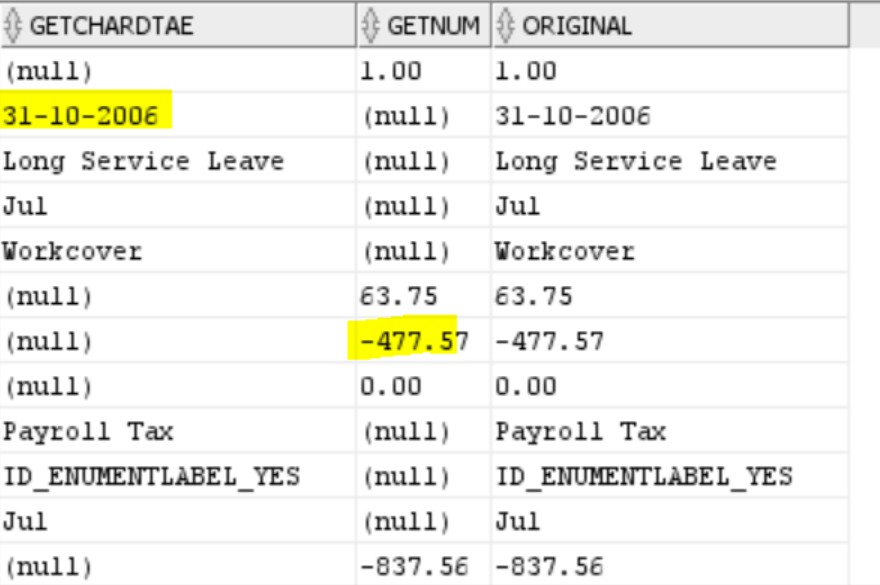
get/extract char , date , numeric values from varchar column

requirement:

amount column having numeric data , char data and date also

So char /date data into one column and numeric (+ve, -ve ) values in another column

use below query to acheive that:

select

case when  trim(TRANSLATE(replace(substr(amount_in_char,0,1),'-','')||substr(amount_in_char,2), '0123456789,.', ' ')) is not null 

then amount_in_char end getchardtae,

case  when trim(TRANSLATE(replace(substr(amount_in_char,0,1),'-','')||substr(amount_in_char,2), '0123456789,.', ' ')) is  null 

then amount_in_char end getnum,

amount_in_char original from w_plan_fs; 


Tuesday, 19 April 2022

Find out the long running queries/locked objects in database

 Use below queries

check the odi session id status in database


Example:

 select * from GV$SESSION WHERE ACTION LIKE '%21622%'; (odi session id)

SELECT * FROM V$SESSION_LONGOPS WHERE SID=1392;

SELECT * FROM V$SESSION WHERE SEQ#='9383';ACTION LIKE '%21622%';

SELECT SQL_FULLTEXT ,LOCKED_TOTAL,SQL_ID FROM GV$SQL WHERE SQL_ID='383g771j';

SELECT * FROM GV$SQL;

alter system kill session '648,51886' IMMEDIATE

select username, status from v$session where SID=12;

Friday, 11 March 2022

employee-manager relationship hierarchy using SQL Query


As you can see, I had to put a hardcoded value for EMPLEVEL field in the Recursive section of the query above. This was because I did not join the Recursive section of the query with our recursive CTE. Now, in order to make the entire hierarchical query work with actual hierarchical level of records assigned, we need to complete the INNER JOIN as in the below query. Notice the difference in value of EMPLEVEL field. This is the complete hierarchical query in CTE format. Please note that ORDER BY is optional here.

WITH OURCTE (EMPNO, ENAME, MGR, EMPLEVEL)
AS (SELECT EMPNO, ENAME, MGR, 1 EMPLEVEL ---Initial Subquery
FROM Emp
WHERE MGR IS NULL
UNION ALL
SELECT E.EMPNO, E.ENAME, E.MGR, CTE.EMPLEVEL + 1 ---Recursive Subquery
FROM EMP E
INNER JOIN OURCTE CTE ON E.MGR = CTE.EMPNO –Inner Join
WHERE E.MGR IS NOT NULL)
SELECT *
FROM OURCTE
ORDER BY EMPLEVEL;

If you need to display the manager name next to the manager ID, refer to the following query:

SELECT CTE.EMPNO, CTE.ENAME, CTE.MGR, E.ENAME “MGR NAME”, CTE.EMPLEVEL
FROM (
WITH OURCTE (EMPNO, ENAME, MGR, EMPLEVEL)
AS (SELECT EMPNO, ENAME, MGR, 1 EMPLEVEL –Initial Subquery
FROM Emp
WHERE MGR IS NULL
UNION ALL
SELECT E.EMPNO, E.ENAME, E.MGR, CTE.EMPLEVEL + 1 –Recursive Subquery
FROM EMP E
INNER JOIN OURCTE CTE ON E.MGR = CTE.EMPNO
WHERE E.MGR IS NOT NULL)
SELECT *
FROM OURCTE
ORDER BY EMPLEVEL) CTE
LEFT OUTER JOIN EMP E ON CTE.MGR = E.EMPNO
ORDER BY CTE.EMPLEVEL,E.ENAME; 

End-to-End Databricks S3 Workflow: Connect, Create Tables, Archive, and Move Files

End-to-End Databricks S3 Workflow: Connect, Create Tables, Archive, and Move Files Introduction An end-to-end Databricks S3 pipeline ofte...