Showing posts with label ODI. Show all posts

Monday, 10 April 2023

Defragmentation Implementation in ODI

Defragmentation Implementation in ODI:

Execute below Code in database to create tables:

create table bi11g_dw.defragment_table as

select owner, table_name,sum(BLOCKS) S,'N' as flag

FROM ALL_TABLES

where owner in ('BI11G_DW', 'BI12C_BIA_ODIREPO','STG') and

(ROUND(((BLOCKS*16/1024)-(NUM_ROWS*AVG_ROW_LEN/1024/1024)),2)/ROUND(((BLOCKS*16/1024)),2))*100 >20 and

--table_name not like '%CFG%' and avg_row_len <> '0' group by owner, table_name order by s ASC;

------------------------------------------------------------------------------------------------------------

create table bi11g_dw.defragment_ind_table as select a.owner, a.table_name, b.index_name, 'N' as FLAG from bi11g_dw.defragment_table a, all_indexes b where a.table_name=b.table_name and a.owner=b.owner;

-----------------------------------------------------------------------------------------

 CREATE TABLE "BI11G_DW"."DEFRAGMENT_TMP" 

   ( "TABLE_NAME" VARCHAR2(50 BYTE)

   )

------------------------------------------------------------------------------------------

ODI Proc code:

-------------------

step 1:

update bi11g_dw.defragment_table  set flag='N';

Step2:

DECLARE

    CUR1 SYS_REFCURSOR;

    CUR2 SYS_REFCURSOR;

    V_TABLENAME VARCHAR2(50);

    V_INDEXNAME VARCHAR2(50);

    V_OWNER VARCHAR2(50);

    BEGIN

      OPEN CUR1 FOR

        select owner,table_name from bi11g_dw.defragment_table WHERE FLAG='N' order by s ASC;

      LOOP

        FETCH CUR1 INTO V_OWNER,V_TABLENAME;

        EXIT WHEN CUR1%NOTFOUND;

        EXECUTE IMMEDIATE'TRUNCATE TABLE bi11g_dw.defragment_tmp';

        insert into  bi11g_dw.defragment_tmp values (V_TABLENAME);

      EXECUTE IMMEDIATE 'ALTER TABLE '||V_OWNER||'.'||V_TABLENAME||' MOVE';

          OPEN CUR2 FOR SELECT OWNER,TABLE_NAME, INDEX_NAME FROM bi11g_dw.defragment_ind_table WHERE TABLE_NAME = V_TABLENAME;

          LOOP

            FETCH CUR2 INTO V_OWNER,V_TABLENAME,V_INDEXNAME;

            EXIT WHEN CUR2%NOTFOUND;

            EXECUTE IMMEDIATE'TRUNCATE TABLE bi11g_dw.defragment_tmp';

        insert into  bi11g_dw.defragment_tmp values (V_TABLENAME);

             EXECUTE IMMEDIATE 'ALTER INDEX '||V_OWNER||'.'||V_INDEXNAME||' REBUILD ONLINE';

             UPDATE bi11g_dw.defragment_ind_table SET FLAG='Y' WHERE TABLE_NAME=V_TABLENAME AND INDEX_NAME=V_INDEXNAME;

             commit;

            END LOOP;

         dbms_stats.gather_table_stats(ownname => V_OWNER, tabname =>V_TABLENAME, estimate_percent =>DBMS_STATS.AUTO_SAMPLE_SIZE, method_opt => 'FOR ALL COLUMNS SIZE AUTO');

      UPDATE bi11g_dw.defragment_table SET FLAG='Y' WHERE TABLE_NAME=V_TABLENAME;

      COMMIT;

       END LOOP;

       END;


ODI Proc2:

---------

update Bi11G_DW.defragment_table set flag='E' where table_name in (select * from Bi11G_DW.defragment_tmp)

How to check table space in database

 Query : To check tablespace in database 

select t.tablespace,  t.totalspace as " Totalspace(MB)",
     round((t.totalspace-nvl(fs.freespace,0)),2) as "Used Space(MB)",
     nvl(fs.freespace,0) as "Freespace(MB)",
     round(((t.totalspace-nvl(fs.freespace,0))/t.totalspace)*100,2) as "%Used",
     round((nvl(fs.freespace,0)/t.totalspace)*100,2) as "% Free",
     us.USERNAME
     from
     (select round(sum(d.bytes)/(1024*1024)) as totalspace,d.tablespace_name tablespace
     from dba_data_files d
     group by d.tablespace_name) t,
     (select round(sum(f.bytes)/(1024*1024)) as freespace,f.tablespace_name tablespace
     from dba_free_space f
     group by f.tablespace_name) fs,
     (  SELECT USERNAME ,default_tablespace FROM  dba_users)  us     where t.tablespace=fs.tablespace (+)   AND t.tablespace(+) = us.default_tablespace
     order by "% Free";

Tuesday, 19 April 2022

Find out the long running queries/locked objects in database

 Use below queries

check the odi session id status in database


Example:

 select * from GV$SESSION WHERE ACTION LIKE '%21622%'; (odi session id)

SELECT * FROM V$SESSION_LONGOPS WHERE SID=1392;

SELECT * FROM V$SESSION WHERE SEQ#='9383';ACTION LIKE '%21622%';

SELECT SQL_FULLTEXT ,LOCKED_TOTAL,SQL_ID FROM GV$SQL WHERE SQL_ID='383g771j';

SELECT * FROM GV$SQL;

alter system kill session '648,51886' IMMEDIATE

select username, status from v$session where SID=12;

Thursday, 9 December 2021

BICC PVO job issues in ODI 12c


#ERROR1:

Caused By: javax.script.ScriptException: javax.script.ScriptException: java.lang.InterruptedException: sleep interrupted


Solution:

BICC extract script failing in the timespane

Go to mapping and select LKM LKM BICC ADW Extrernal table-- BICC job timeout- 4000 or 1000 or 0


#ERROR2:

ODI-1228: Task Merge rows-IKM Oracle Merge-Load TGT_FSCMTOPMODELAM_FINVRMRRSHAREDPUBLICMODELAM_PERFOBLIGATIONLINDISTSPVO_1 fails on the target connection .

Caused By: java.sql.SQLException: ORA-30926: unable to get a stable set of rows in the source tables


Solution:

use ikm oracle incremental update merge instead of ikm oracle merge

Check primary key enabled in mapping .

If same data trying to insert /update on target table  which is already exist in target table then it will not allow to update or insert using merge

delete data from target or source based on requirement

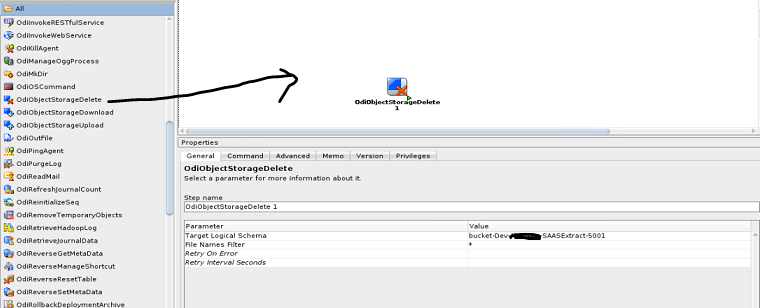
Delete files from object storage in odi package

 Delete files from object storage using odi object


configure oracle object storage technology in topology 

create package

drag the OdiObjectStorageDelete object

add details for target logical schema, filter file names 

save and execute


BICC Reset to Full Extract by Offering ID using groovy script

 BICC Reset to Full Extract by Offering ID using groovy script

ODI procedure: 

import oracle.odi.core.OdiInstance

import java.sql.Connection

import java.sql.Statement

import java.sql.ResultSet

import groovy.json.*

import java.net.URL

import java.net.HttpURLConnection

import org.apache.http.HttpEntity;

import org.apache.http.HttpResponse;

import org.apache.http.StatusLine;

import org.apache.http.HttpHost;

import org.apache.http.client.CredentialsProvider;

import org.apache.http.client.methods.HttpPost;

import org.apache.http.auth.Credentials;

import org.apache.http.auth.UsernamePasswordCredentials;

import org.apache.http.auth.AuthScope;

import org.apache.http.impl.client.BasicCredentialsProvider;

import org.apache.http.impl.client.CloseableHttpClient;

import org.apache.http.impl.client.HttpClientBuilder;

import org.apache.http.entity.ByteArrayEntity;

import org.apache.http.entity.ContentType;

import org.apache.http.util.EntityUtils;

import javax.xml.stream.XMLInputFactory;

import javax.xml.stream.XMLStreamConstants;

import javax.xml.stream.XMLStreamReader;


// Enter username, pwd

username="XX_SVC_BICC"

//password="************"

//password="<@=odiRef.getInfo ("BICC_CRM")@>"

password = "<@=odiRef.getDataServerInfo("BICC_PASSWORD", "BICC_CRM") @>"

// Create Connection object to the schema

Connection con = odiRef.getJDBCConnectionFromLSchema( "<%=odiRef.getOption("DB_SCHEMA")%>", "<%=odiRef.getOption("ODI_CONTEXT")%>" )

// Create SQL Statement

Statement stmt = con.createStatement()


// Credentials for basic authorization need to be passed through as username:pwd

userCredentials = username + ":" + password;

// Basic authorization is set up, but the encoding for credentials need to be changed.

basicAuth = 'Basic '+javax.xml.bind.DatatypeConverter.printBase64Binary(userCredentials.getBytes())


// Get the Encoding

String encoding = Base64.getEncoder().encodeToString(userCredentials.getBytes("utf-8"))


sql = "select distinct OFFERING_ID from " + "<%=odiRef.getOption("DB_SCHEMA")%>" + "." + "<%=odiRef.getOption("BICC_OFFERING_DATASTORE_TABLE")%>" 


try {

  ResultSet rs = stmt.executeQuery( sql )

  while (rs.next()) {

    println('--------------------------------------------------------------------')

    println('Reset to Full Extract for Offering: ' + rs.getString("OFFERING_ID"))


    address = "https://ea-" + "<%=odiRef.getOption("BICC_INSTANCE")%>" + ".fa.us2.oraclecloud.com/biacm/rest/meta/offerings/"+ rs.getString("OFFERING_ID") +"/actions/resetToFull"

    println(address)

    urlInfo = address.toURL()                                            // Variable converted to URL


    connection = urlInfo.openConnection()


    connection.setRequestMethod("POST")

    connection.setRequestProperty("Accept", "application/json")

    connection.setRequestProperty("Content-Type", "application/json")    

    connection.setDoInput(true)

    connection.setDoOutput(true)

    connection.setRequestProperty("Content-Length", encoding.length().toString())    

    connection.setRequestProperty("Authorization", 'Basic '+encoding)


    DataOutputStream writer = new DataOutputStream(connection.getOutputStream())

    writer.writeBytes("REPLACE ME WITH DATA TO BE WRITTEN")

    writer.flush()

    println "Connection Class: " + connection.class

    int respCode = connection.getResponseCode()

    println "Response Code/Message: " + respCode

    connection.disconnect()

  }

} finally {

  if (stmt != null) { stmt.closeOnCompletion() }

}


Load Data From ObjectStorage to ADW using groovy script in ODI procedure

 Load Data From ObjectStorage to ADW using groovy script in ODI procedure

ODI procedure: Groovy script 

// Export URIS list


sourceDataStore = "FscmTopModelAM.ScmExtractAM.EgpBiccExtractAM.ItemExtractPVO"

filePrefix = "file_" + sourceDataStore.toLowerCase().replaceAll("\\.","_") + "-"

sql = "SELECT object_name, bytes FROM table(dbms_cloud.list_objects(credential_name => 'ODI',location_uri => 'https://bjectstorage.us1.oraclecloud.com/v1/compsvc/bucket-DevSAASExtract-5001/')) WHERE object_name LIKE '${filePrefix}%'"

summaryMessage = ""

summaryMessage = "Query :\n"

summaryMessage = summaryMessage + sql

odiRef.setSummaryMessage(summaryMessage)

con = odiRef.getJDBCConnection( "DEST" )

try {

    stmt = con.createStatement()

    result = stmt.executeQuery( sql )

} finally {

    if (stmt != null) { stmt.closeOnCompletion() }

}

summaryMessage = summaryMessage + "\n\nExtract files:\n"

uris = ""

if (!result.isBeforeFirst() && result.getRow() == 0) {

} else {

  while (result.next()) {


    uris = uris + 'https://objectstorage.us-ashburn-1.oraclecloud.com/n/compsvc/b/bucket-DevSAASExtract-5001/o/' + result.getString(1) + ",\n"


    summaryMessage = summaryMessage + result.getString(1) + "  :  " + result.getString(2)  + "\n"

  }

  uris = uris.trim().substring(0, uris.length() - 2)

  println(uris)

}

summaryMessage = summaryMessage + "\n\nURIs :\n"

summaryMessage = summaryMessage + uris

odiRef.setSummaryMessage(summaryMessage)

if (uris.equals("")) {

   throw new OdiKMException( "No extraction files found on Object Storage for given search criteria.");

}


// Load Data to ADW

table_name = 'C$_0FSCMTOPMODELAM_SCMEXTRACTAM_EGPBICCEXTRACTAM_ITEMEXTRACTPVO_EXT';

sql = """

DECLARE

  uri_list CLOB;

  ext_table_name varchar2(200);

BEGIN

  uri_list := '${uris}';

  ext_table_name := '${table_name}';

  dbms_cloud.create_external_table(

    table_name => ext_table_name,

    file_uri_list => uri_list,

    credential_name =>'ODI',

    column_list => 'ITEMBASEPEOACCEPTABLEEARLYDAYS NUMBER, ITEMBASEPEOACCEPTABLERATEDECREASE NUMBER, ITEMBASEPEOACCEPTABLERATEINCREASE NUMBER, ITEMBASEPEOACCOUNTINGRULEID NUMBER(18,0), ITEMBASEPEOACDTYPE VARCHAR2(30), ITEMBASEPEOALLOWEXPRESSDELIVERYFLAG VARCHAR2(1), ITEMBASEPEOALLOWITEMDESCUPDATEFLAG VARCHAR2(1), ITEMBASEPEOALLOWMAINTENANCEASSETFLAG VARCHAR2(1), ITEMBASEPEOALLOWSUBSTITUTERECEIPTSFLAG VARCHAR2(1), ITEMBASEPEOALLOWSUSPENDFLAG VARCHAR2(1), ITEMBASEPEOALLOWTERMINATEFLAG VARCHAR2(1), ITEMBASEPEOALLOWUNORDEREDRECEIPTSFLAG VARCHAR2(1), ITEMBASEPEOALLOWEDUNITSLOOKUPCODE NUMBER, ITEMBASEPEOALTITEMCODE VARCHAR2(40), ITEMBASEPEOAPPROVALSTATUS VARCHAR2(30), ITEMBASEPEOASNAUTOEXPIREFLAG NUMBER, ITEMBASEPEOASSETCATEGORYID NUMBER(18,0), ITEMBASEPEOASSETCLASS VARCHAR2(30), ITEMBASEPEOASSETTRACKEDFLAG VARCHAR2(1), ITEMBASEPEOATOFORECASTCONTROL NUMBER, ITEMBASEPEOATPCOMPONENTSFLAG VARCHAR2(1), ITEMBASEPEOATPFLAG VARCHAR2(1), ITEMBASEPEOATPRULEID NUMBER(18,0), ITEMBASEPEOATTRIBUTE10 VARCHAR2(240), ITEMBASEPEOAUTOCREATEDCONFIGFLAG VARCHAR2(1), ITEMBASEPEOAUTOLOTALPHAPREFIX VARCHAR2(80), ITEMBASEPEOAUTOREDUCEMPS NUMBER(22,0), ITEMBASEPEOAUTOSERIALALPHAPREFIX VARCHAR2(80), ITEMBASEPEOBACKORDERABLEFLAG VARCHAR2(1), ITEMBASEPEOBACKTOBACKENABLED VARCHAR2(1), ITEMBASEPEOBASEITEMID NUMBER(18,0), ITEMBASEPEOBOMITEMTYPE NUMBER, ITEMBASEPEOBUILDINWIPFLAG VARCHAR2(1), ITEMBASEPEOBULKPICKEDFLAG VARCHAR2(1), ITEMBASEPEOBUYERID NUMBER(18,0), ITEMBASEPEOCARRYINGCOST NUMBER, ITEMBASEPEOCASNUMBER VARCHAR2(30), ITEMBASEPEOCHANGEBITMAP VARCHAR2(400), ITEMBASEPEOCHANGELINEID NUMBER(20,0), ITEMBASEPEOCHARGEPERIODICITYCODE VARCHAR2(3), ITEMBASEPEOCHECKSHORTAGESFLAG VARCHAR2(1), ITEMBASEPEOCHILDLOTFLAG VARCHAR2(1), ITEMBASEPEOCHILDLOTPREFIX VARCHAR2(30), ITEMBASEPEOCHILDLOTSTARTINGNUMBER NUMBER, ITEMBASEPEOCHILDLOTVALIDATIONFLAG VARCHAR2(1), ITEMBASEPEOCOLLATERALFLAG VARCHAR2(1), ITEMBASEPEOCOMMSACTIVATIONREQDFLAG VARCHAR2(1), ITEMBASEPEOCOMNSUPPLYPRJDEMANDFLAG VARCHAR2(1), ITEMBASEPEOCOMPLETENESSSCORE NUMBER(3,0), ITEMBASEPEOCONFIGMATCH VARCHAR2(30), ITEMBASEPEOCONFIGMODELTYPE VARCHAR2(30), ITEMBASEPEOCONFIGORGS VARCHAR2(30), ITEMBASEPEOCONSIGNEDFLAG NUMBER, ITEMBASEPEOCONTAINERITEMFLAG VARCHAR2(1), ITEMBASEPEOCONTAINERTYPECODE VARCHAR2(30), ITEMBASEPEOCONTINOUSTRANSFER NUMBER, ITEMBASEPEOCONTRACTITEMTYPECODE VARCHAR2(30), ITEMBASEPEOCONTRACTMANUFACTURING VARCHAR2(1), ITEMBASEPEOCONVERGENCE NUMBER, ITEMBASEPEOCOPYLOTATTRIBUTEFLAG VARCHAR2(1), ITEMBASEPEOCOSTINGENABLEDFLAG VARCHAR2(1), ITEMBASEPEOCOVERAGESCHEDULEID NUMBER(18,0), ITEMBASEPEOCREATESUPPLYFLAG VARCHAR2(1), ITEMBASEPEOCREATEDBY VARCHAR2(64), ITEMBASEPEOCREATIONDATE TIMESTAMP(9), ITEMBASEPEOCRITICALCOMPONENTFLAG NUMBER, ITEMBASEPEOCSSENABLEDFLAG VARCHAR2(1), ITEMBASEPEOCUMMANUFACTURINGLEADTIME NUMBER, ITEMBASEPEOCUMULATIVETOTALLEADTIME NUMBER, ITEMBASEPEOCURRENTPHASECODE VARCHAR2(120), ITEMBASEPEOCURRENTPHASEID NUMBER(18,0), ITEMBASEPEOCUSTOMERORDERENABLEDFLAG VARCHAR2(1), ITEMBASEPEOCUSTOMERORDERFLAG VARCHAR2(1), ITEMBASEPEOCYCLECOUNTENABLEDFLAG VARCHAR2(1), ITEMBASEPEODAYSEARLYRECEIPTALLOWED NUMBER, ITEMBASEPEODAYSLATERECEIPTALLOWED NUMBER, ITEMBASEPEODAYSMAXINVSUPPLY NUMBER, ITEMBASEPEODAYSMAXINVWINDOW NUMBER, ITEMBASEPEODAYSOFCOVER NUMBER, ITEMBASEPEODAYSTGTINVSUPPLY NUMBER, ITEMBASEPEODAYSTGTINVWINDOW NUMBER, ITEMBASEPEODEFAULTGRADE VARCHAR2(150), ITEMBASEPEODEFAULTINCLUDEINROLLUPFLAG VARCHAR2(1), ITEMBASEPEODEFAULTLOTSTATUSID NUMBER(18,0), ITEMBASEPEODEFAULTSERIALSTATUSID NUMBER(18,0), ITEMBASEPEODEFAULTSHIPPINGORG NUMBER(18,0), ITEMBASEPEODEFAULTSOSOURCETYPE VARCHAR2(30), ITEMBASEPEODEFAULTTEMPLATEFLAG VARCHAR2(1), ITEMBASEPEODEFECTTRACKINGONFLAG VARCHAR2(1), ITEMBASEPEODEMANDPERIOD NUMBER, ITEMBASEPEODEMANDTIMEFENCECODE NUMBER, ITEMBASEPEODEMANDTIMEFENCEDAYS NUMBER, ITEMBASEPEODIMENSIONUOMCODE VARCHAR2(3), ITEMBASEPEODIVERGENCE NUMBER, ITEMBASEPEODOWNLOADABLEFLAG VARCHAR2(1), ITEMBASEPEODQREQUIREDFLAG VARCHAR2(1), ITEMBASEPEODQSEMANTICKEY VARCHAR2(4000), ITEMBASEPEODRPPLANNEDFLAG NUMBER, ITEMBASEPEODUALUOMCONTROL NUMBER, ITEMBASEPEODUALUOMDEVIATIONHIGH NUMBER, ITEMBASEPEODUALUOMDEVIATIONLOW NUMBER, ITEMBASEPEOEFFECTIVITYCONTROL NUMBER, ITEMBASEPEOELECTRONICFLAG VARCHAR2(1), ITEMBASEPEOELIGIBILITYCOMPATIBILITYRULE VARCHAR2(1), ITEMBASEPEOENABLEGENEALOGYTRACKINGFLAG VARCHAR2(1), ITEMBASEPEOENABLEIOTFLAG VARCHAR2(1), ITEMBASEPEOENABLEDFLAG VARCHAR2(1), ITEMBASEPEOENDASSEMBLYPEGGINGFLAG VARCHAR2(1), ITEMBASEPEOENDDATEACTIVE TIMESTAMP(9), ITEMBASEPEOENFORCESHIPTOLOCATIONCODE VARCHAR2(25), ITEMBASEPEOENGINEEREDITEMFLAG VARCHAR2(1), ITEMBASEPEOENGINEERINGITEMID NUMBER(18,0), ITEMBASEPEOEQUIPMENTTYPE NUMBER, ITEMBASEPEOEVENTFLAG VARCHAR2(1), ITEMBASEPEOEXCLUDEFROMBUDGETFLAG NUMBER, ITEMBASEPEOEXPENDITURETYPEID NUMBER(18,0), ITEMBASEPEOEXPENSEACCOUNT NUMBER(18,0), ITEMBASEPEOEXPIRATIONACTIONCODE VARCHAR2(32), ITEMBASEPEOEXPIRATIONACTIONINTERVAL NUMBER, ITEMBASEPEOFINANCINGALLOWEDFLAG VARCHAR2(1), ITEMBASEPEOFIXEDDAYSSUPPLY NUMBER, ITEMBASEPEOFIXEDLEADTIME NUMBER, ITEMBASEPEOFIXEDLOTMULTIPLIER NUMBER, ITEMBASEPEOFIXEDORDERQUANTITY NUMBER, ITEMBASEPEOFORCEPURCHASELEADTIMEFLAG VARCHAR2(1), ITEMBASEPEOFORECASTHORIZON NUMBER, ITEMBASEPEOFULLLEADTIME NUMBER, ITEMBASEPEOGDSNOUTBOUNDENABLEDFLAG VARCHAR2(1), ITEMBASEPEOGRADECONTROLFLAG VARCHAR2(1), ITEMBASEPEOHARDPEGGINGLEVEL VARCHAR2(25), ITEMBASEPEOHAZARDCLASSID NUMBER(18,0), ITEMBASEPEOHAZARDOUSMATERIALFLAG VARCHAR2(1), ITEMBASEPEOHOLDDAYS NUMBER, ITEMBASEPEOIMPLEMENTATIONDATE DATE, ITEMBASEPEOINDIVISIBLEFLAG VARCHAR2(1), ITEMBASEPEOINSPECTIONREQUIREDFLAG VARCHAR2(1), ITEMBASEPEOINTERNALORDERENABLEDFLAG VARCHAR2(1), ITEMBASEPEOINTERNALORDERFLAG VARCHAR2(1), ITEMBASEPEOINTERNALVOLUME NUMBER, ITEMBASEPEOINVENTORYASSETFLAG VARCHAR2(1), ITEMBASEPEOINVENTORYCARRYPENALTY NUMBER, ITEMBASEPEOINVENTORYITEMFLAG VARCHAR2(1), ITEMBASEPEOINVENTORYITEMID NUMBER(18,0), ITEMBASEPEOINVENTORYITEMSTATUSCODE VARCHAR2(10), ITEMBASEPEOINVENTORYORGANIZATIONID NUMBER(18,0), ITEMBASEPEOINVENTORYPLANNINGCODE NUMBER, ITEMBASEPEOINVOICECLOSETOLERANCE NUMBER, ITEMBASEPEOINVOICEENABLEDFLAG VARCHAR2(1), ITEMBASEPEOINVOICEMATCHOPTION NUMBER(1,0), ITEMBASEPEOINVOICEABLEITEMFLAG VARCHAR2(1), ITEMBASEPEOINVOICINGRULEID NUMBER(18,0), ITEMBASEPEOITEMCATALOGGROUPID NUMBER(18,0), ITEMBASEPEOITEMNUMBER VARCHAR2(300), ITEMBASEPEOITEMTYPE VARCHAR2(30), ITEMBASEPEOLASTSUBMITTEDNIRID NUMBER(18,0), ITEMBASEPEOLASTUPDATEDATE TIMESTAMP(9), ITEMBASEPEOLASTUPDATELOGIN VARCHAR2(32), ITEMBASEPEOLASTUPDATEDBY VARCHAR2(64), ITEMBASEPEOLEADTIMELOTSIZE NUMBER, ITEMBASEPEOLISTPRICEPERUNIT NUMBER, ITEMBASEPEOLOCATIONCONTROLCODE NUMBER, ITEMBASEPEOLOTCONTROLCODE NUMBER, ITEMBASEPEOLOTDIVISIBLEFLAG VARCHAR2(1), ITEMBASEPEOLOTMERGEENABLED VARCHAR2(1), ITEMBASEPEOLOTSPLITENABLED VARCHAR2(1), ITEMBASEPEOLOTSTATUSENABLED VARCHAR2(1), ITEMBASEPEOLOTSUBSTITUTIONENABLED VARCHAR2(1), ITEMBASEPEOLOTTRANSLATEENABLED VARCHAR2(1), ITEMBASEPEOMARKETPRICE NUMBER, ITEMBASEPEOMATCHAPPROVALLEVEL NUMBER(1,0), ITEMBASEPEOMATERIALBILLABLEFLAG VARCHAR2(30), ITEMBASEPEOMATURITYDAYS NUMBER, ITEMBASEPEOMAXMINMAXQUANTITY NUMBER, ITEMBASEPEOMAXIMUMLOADWEIGHT NUMBER, ITEMBASEPEOMAXIMUMORDERQUANTITY NUMBER, ITEMBASEPEOMINMINMAXQUANTITY NUMBER, ITEMBASEPEOMINIMUMFILLPERCENT NUMBER, ITEMBASEPEOMINIMUMLICENSEQUANTITY NUMBER, ITEMBASEPEOMINIMUMORDERQUANTITY NUMBER, ITEMBASEPEOMRPCALCULATEATPFLAG VARCHAR2(1), ITEMBASEPEOMRPPLANNINGCODE NUMBER, ITEMBASEPEOMRPSAFETYSTOCKCODE NUMBER, ITEMBASEPEOMRPSAFETYSTOCKPERCENT NUMBER, ITEMBASEPEOMTLTRANSACTIONSENABLEDFLAG VARCHAR2(1), ITEMBASEPEOMUSTUSEAPPROVEDVENDORFLAG VARCHAR2(1), ITEMBASEPEONEGATIVEMEASUREMENTERROR NUMBER, ITEMBASEPEONEGOTIATIONREQUIREDFLAG VARCHAR2(1), ITEMBASEPEOONTPRICINGQTYSOURCE VARCHAR2(30), ITEMBASEPEOOPERATIONSLACKPENALTY NUMBER, ITEMBASEPEOOPTIONSPECIFICSOURCED NUMBER, ITEMBASEPEOORDERCOST NUMBER, ITEMBASEPEOORDERABLEONWEBFLAG VARCHAR2(1), ITEMBASEPEOORGANIZATIONID NUMBER(18,0), ITEMBASEPEOOUTSIDEOPERATIONUOMTYPE VARCHAR2(25), ITEMBASEPEOOUTSIDEPROCESSSERVICEFLAG VARCHAR2(1), ITEMBASEPEOOVERRETURNTOLERANCE NUMBER, ITEMBASEPEOOVERSHIPMENTTOLERANCE NUMBER, ITEMBASEPEOOVERCOMPLETIONTOLERANCETYPE NUMBER, ITEMBASEPEOOVERCOMPLETIONTOLERANCEVALUE NUMBER, ITEMBASEPEOOVERRUNPERCENTAGE NUMBER, ITEMBASEPEOPARENTCHILDGENERATIONFLAG VARCHAR2(1), ITEMBASEPEOPAYMENTTERMSID NUMBER(18,0), ITEMBASEPEOPICKCOMPONENTSFLAG VARCHAR2(1), ITEMBASEPEOPICKINGRULEID NUMBER(18,0), ITEMBASEPEOPLANNEDINVPOINTFLAG VARCHAR2(1), ITEMBASEPEOPLANNERCODE VARCHAR2(10), ITEMBASEPEOPLANNINGEXCEPTIONSET VARCHAR2(10), ITEMBASEPEOPLANNINGMAKEBUYCODE NUMBER, ITEMBASEPEOPLANNINGTIMEFENCECODE NUMBER, ITEMBASEPEOPLANNINGTIMEFENCEDAYS NUMBER, ITEMBASEPEOPOSITIVEMEASUREMENTERROR NUMBER, ITEMBASEPEOPOSTPROCESSINGLEADTIME NUMBER, ITEMBASEPEOPREPOSITIONPOINT VARCHAR2(1), ITEMBASEPEOPREPROCESSINGLEADTIME NUMBER, ITEMBASEPEOPRICETOLERANCEPERCENT NUMBER, ITEMBASEPEOPRIMARYUOMCODE VARCHAR2(3), ITEMBASEPEOPROCESSCOSTINGENABLEDFLAG VARCHAR2(1), ITEMBASEPEOPROCESSEXECUTIONENABLEDFLAG VARCHAR2(1), ITEMBASEPEOPROCESSQUALITYENABLEDFLAG VARCHAR2(1), ITEMBASEPEOPROCESSSUPPLYLOCATORID NUMBER(18,0), ITEMBASEPEOPROCESSSUPPLYSUBINVENTORY VARCHAR2(10), ITEMBASEPEOPROCESSYIELDLOCATORID NUMBER(18,0), ITEMBASEPEOPROCESSYIELDSUBINVENTORY VARCHAR2(10), ITEMBASEPEOPRODUCTFAMILYITEMID NUMBER(18,0), ITEMBASEPEOPURCHASINGENABLEDFLAG VARCHAR2(1), ITEMBASEPEOPURCHASINGITEMFLAG VARCHAR2(1), ITEMBASEPEOPURCHASINGTAXCODE VARCHAR2(50), ITEMBASEPEOQSCSALESPRODUCTTYPE VARCHAR2(20), ITEMBASEPEOQTYRCVEXCEPTIONCODE VARCHAR2(25), ITEMBASEPEOQTYRCVTOLERANCE NUMBER, ITEMBASEPEORECEIPTDAYSEXCEPTIONCODE VARCHAR2(25), ITEMBASEPEORECEIPTREQUIREDFLAG VARCHAR2(1), ITEMBASEPEORECEIVECLOSETOLERANCE NUMBER, ITEMBASEPEORECEIVINGROUTINGID NUMBER(18,0), ITEMBASEPEORECIPEENABLEDFLAG VARCHAR2(1), ITEMBASEPEORECOVEREDPARTDISPCODE VARCHAR2(30), ITEMBASEPEORELEASETIMEFENCECODE NUMBER, ITEMBASEPEORELEASETIMEFENCEDAYS NUMBER, ITEMBASEPEOREPAIRLEADTIME NUMBER, ITEMBASEPEOREPAIRPROGRAM NUMBER, ITEMBASEPEOREPAIRYIELD NUMBER, ITEMBASEPEOREPETITIVEPLANNINGFLAG VARCHAR2(1), ITEMBASEPEOREPLACEMENTTYPE VARCHAR2(30), ITEMBASEPEOREPLENISHTOORDERFLAG VARCHAR2(1), ITEMBASEPEOREQUIRESFULFILLMENTLOCFLAG VARCHAR2(1), ITEMBASEPEOREQUIRESITMASSOCIATIONFLAG VARCHAR2(1), ITEMBASEPEORESERVABLETYPE NUMBER, ITEMBASEPEORESTRICTLOCATORSCODE NUMBER, ITEMBASEPEORESTRICTSUBINVENTORIESCODE NUMBER, ITEMBASEPEORETESTINTERVAL NUMBER, ITEMBASEPEORETURNINSPECTIONREQUIREMENT NUMBER, ITEMBASEPEORETURNABLEFLAG VARCHAR2(1), ITEMBASEPEOREVISIONQTYCONTROLCODE NUMBER, ITEMBASEPEOROUNDINGCONTROLTYPE NUMBER, ITEMBASEPEOROUNDINGFACTOR NUMBER, ITEMBASEPEOSAFETYSTOCKBUCKETDAYS NUMBER, ITEMBASEPEOSAFETYSTOCKPLANNINGMETHOD VARCHAR2(30), ITEMBASEPEOSALESACCOUNT NUMBER(18,0), ITEMBASEPEOSALESPRODUCTTYPE VARCHAR2(20), ITEMBASEPEOSECONDARYDEFAULTIND VARCHAR2(30), ITEMBASEPEOSECONDARYUOMCODE VARCHAR2(3), ITEMBASEPEOSERIALNUMBERCONTROLCODE NUMBER, ITEMBASEPEOSERIALSTATUSENABLED VARCHAR2(1), ITEMBASEPEOSERVBILLINGENABLEDFLAG VARCHAR2(1), ITEMBASEPEOSERVREQENABLEDCODE VARCHAR2(30), ITEMBASEPEOSERVICEDURATION NUMBER, ITEMBASEPEOSERVICEDURATIONPERIODCODE VARCHAR2(10), ITEMBASEPEOSERVICEDURATIONTYPECODE VARCHAR2(3), ITEMBASEPEOSERVICESTARTDELAY NUMBER, ITEMBASEPEOSERVICESTARTTYPECODE VARCHAR2(3), ITEMBASEPEOSERVICESTARTINGDELAY NUMBER, ITEMBASEPEOSERVICEABLEPRODUCTFLAG VARCHAR2(1), ITEMBASEPEOSHELFLIFECODE NUMBER, ITEMBASEPEOSHELFLIFEDAYS NUMBER, ITEMBASEPEOSHIPMODELCOMPLETEFLAG VARCHAR2(1), ITEMBASEPEOSHIPPABLEITEMFLAG VARCHAR2(1), ITEMBASEPEOSHRINKAGERATE NUMBER, ITEMBASEPEOSOAUTHORIZATIONFLAG NUMBER, ITEMBASEPEOSOTRANSACTIONSFLAG VARCHAR2(1), ITEMBASEPEOSOURCEORGANIZATIONID NUMBER(18,0), ITEMBASEPEOSOURCESUBINVENTORY VARCHAR2(10), ITEMBASEPEOSOURCETYPE NUMBER, ITEMBASEPEOSTARTAUTOLOTNUMBER VARCHAR2(80), ITEMBASEPEOSTARTAUTOSERIALNUMBER VARCHAR2(80), ITEMBASEPEOSTARTDATEACTIVE TIMESTAMP(9), ITEMBASEPEOSTDLOTSIZE NUMBER, ITEMBASEPEOSTOCKENABLEDFLAG VARCHAR2(1), ITEMBASEPEOSTYLEITEMFLAG VARCHAR2(1), ITEMBASEPEOSTYLEITEMID NUMBER(18,0), ITEMBASEPEOSUBCONTRACTINGCOMPONENT NUMBER, ITEMBASEPEOSUBSTITUTIONWINDOWCODE NUMBER, ITEMBASEPEOSUBSTITUTIONWINDOWDAYS NUMBER, ITEMBASEPEOSUMMARYFLAG VARCHAR2(1), ITEMBASEPEOTAXCODE VARCHAR2(50), ITEMBASEPEOTAXABLEFLAG VARCHAR2(1), ITEMBASEPEOTEMPLATEITEMFLAG VARCHAR2(1), ITEMBASEPEOTEMPLATENAME VARCHAR2(300), ITEMBASEPEOTRACKINGQUANTITYIND VARCHAR2(30), ITEMBASEPEOTRADEITEMDESCRIPTOR VARCHAR2(35), ITEMBASEPEOUNNUMBERID NUMBER(18,0), ITEMBASEPEOUNDERRETURNTOLERANCE NUMBER, ITEMBASEPEOUNDERSHIPMENTTOLERANCE NUMBER, ITEMBASEPEOUNITHEIGHT NUMBER, ITEMBASEPEOUNITLENGTH NUMBER, ITEMBASEPEOUNITOFISSUE VARCHAR2(25), ITEMBASEPEOUNITVOLUME NUMBER, ITEMBASEPEOUNITWEIGHT NUMBER, ITEMBASEPEOUNITWIDTH NUMBER, ITEMBASEPEOVARIABLELEADTIME NUMBER, ITEMBASEPEOVEHICLEITEMFLAG VARCHAR2(1), ITEMBASEPEOVERSIONENDDATE DATE, ITEMBASEPEOVERSIONID NUMBER(20,0), ITEMBASEPEOVERSIONSTARTDATE DATE, ITEMBASEPEOVMIFIXEDORDERQUANTITY NUMBER, ITEMBASEPEOVMIFORECASTTYPE NUMBER, ITEMBASEPEOVMIMAXIMUMDAYS NUMBER, ITEMBASEPEOVMIMAXIMUMUNITS NUMBER, ITEMBASEPEOVMIMINIMUMDAYS NUMBER, ITEMBASEPEOVMIMINIMUMUNITS NUMBER, ITEMBASEPEOVOLUMEUOMCODE VARCHAR2(3), ITEMBASEPEOWEBSTATUS VARCHAR2(30), ITEMBASEPEOWEIGHTUOMCODE VARCHAR2(3), ITEMBASEPEOWHUPDATEDATE DATE, ITEMBASEPEOWIPSUPPLYLOCATORID NUMBER(18,0), ITEMBASEPEOWIPSUPPLYSUBINVENTORY VARCHAR2(10), ITEMBASEPEOWIPSUPPLYTYPE NUMBER(18,0), ITEMTRANSLATIONPEODESCRIPTION VARCHAR2(240), ITEMTRANSLATIONPEOLANGUAGE VARCHAR2(4), ITEMTRANSLATIONPEOLONGDESCRIPTION VARCHAR2(4000)',

    format => json_object(

    'type' VALUE 'CSV',

    'skipheaders' VALUE '1',

    'compression' VALUE 'gzip',

    'dateformat' VALUE 'AUTO',

    'timestampformat' VALUE 'YYYY-MM-DD HH24:MI:SS.FF6',

    'rejectlimit' VALUE 'UNLIMITED')

 );

END;

"""

odiRef.setSummaryMessage(sql)

if ( con == null ) {

    con = odiRef.getJDBCConnection( "DEST" )

}

try {

    stmt = con.createStatement()

    stmt.execute( sql )

} finally {

    if (stmt != null) { stmt.closeOnCompletion() }

}


Sunday, 1 November 2020

Generate Scenario and Scheduling job in odi


A Scenario is compiled or executable object like .exe; we can generate a scenario for packages, interfaces or variables, procedures.

Scenarios generated for procedures, interfaces or variables are single step scenarios that execute the procedure, interface or refresh the variable.

Scenario variables are variables used in the scenario that should be set when starting the scenario to parameterize its behavior.

Once generated, the scenario is stored inside the work repository. The scenario can be exported then imported to another repository and used in different contexts. A scenario can only be created from a development work repository, but can be imported into both development and execution work repositories.

Generating a scenario:

Go to designer navigator -> open project -> First folder ->interface_name then right click on the interface and select generate scenario.


Enter the name and version of the scenario.


If we have done some changed based on the requirement, then we need to regenerate the scenario else the previous version will gets executed, so we need to regenerate the scenario.

Regenerating the scenario: Right click on the scenario which is already been generated.


Generating group of scenarios:

When a set of packages, interfaces, procedures and variables grouped under a project or folder is finished and tested, you can generate the scenarios.


Steps:

Right click on the project or folder containing group of objects then click generate all scenarios. 

Then it will show one window to choose the mode of generation


Generation mode:

·         Replace: Overwrites the last scenario version of each object with a new one but with the same ID, name and version. Sessions, scenario reports and schedules are deleted. If no scenario exists for an object, a scenario with version number 001 is created by default.

·         Re-generate: Overwrites the last scenario version for each object with a new one with the same id, name and version. It preserves the schedule, sessions and scenario reports. If no scenario exists for an object, no scenario is created using this mode.

·         Creation: Creates a new scenario for each object with the same name as the last scenario version and with an automatically incremented version number. If no scenario exists for an object, a scenario named after the object with version number 001 is created.

Scheduling:

In order to schedule any object first we need to create a scenario for that and then schedule the object.

Scenarios are mainly used to schedule the objects like interfaces, variables, procedures.

Expand the scenario->scheduling->Right click on the scheduling->new scheduling

'' failed to upload. Invalid response: Unexpected token U in JSON at position 0


Scheduling window will open, where we need to configure the scheduling. To schedule an object, agent is mandatory.


Definition:

Context: Context into which the scenario or Load Plan is started.

Agent: Agent executing the scenario or Load Plan.

Log Level: Level of logging information to retain

Status:

Active: The scheduling will be active when the agent is restarted or when the scheduling of the physical agent is updated.

Inactive: The schedule is not active and will not run.

Active for period: Activity range of the schedule. A schedule active for a period of time will only run within this given period.

Execution:

Frequency of execution option (annual, monthly,... simple). This option is completed by a set of options that depend on this main option.


Execution Cycle:

Properties

Description

None (Execute once)

The scenario or Load Plan is executed only one time.

Many times

The scenario or Load Plan is repeated several times.

  • Maximum number of repetitions: The maximum number of times the scenario is repeated during the cycle.
  • Maximum Cycle Duration: As soon as the maximum time is reached, the scenario is no longer restarted, and the cycle stops.
  • Interval between repetitions: The downtime between each scenario execution.

Constraints

Allows limitations to be placed on one cycle iteration, in the event of a problem during execution.

  • Number of Attempts on Failure: Maximum number of consecutive execution attempts for one iteration.
  • Stop Execution After: Maximum execution time for one iteration. If this time is reached, the scenario or Load Plan is automatically stopped.


Variables: On the Variables tab, unselect Latest Value for variables for which you want to provide a Value. Only variables used in the scenario or Load Plan and flagged as parameters for this scenario or Load Plan appear in this tab.


After defining the schedule, we need to update the agent which is accomplished with the schedule. So, go to topology->agents->double click the agent -> update the schedule


If we want to monitor the schedule, then we need to click view schedule


Then below window will be displayed


We can even schedule the object from console also,


In order to execute the scenarios for ( interfaces/packages ) from the web, we have an console named:

ODICONSOLE

url: 100.9.80.90:8001/odiconsole/

select the relevant repository and give the credentials to login followed by execution of scenarios.


Setting up default agent:


Saturday, 31 October 2020

Load data from Flat File to Oracle DB

Advantage:

Using this, we can load data from  flat file to Oracle easily,

To export Flat File to Oracle DB, we have to follow below steps.

Ø  For that, we have to Create project to create a interface

Ø  We have to   import knowledge modules

Ø  we need to define the 2 Data Servers, the 2 physical schemas and associate them with the relevant logical schemas in ODI Topology Navigator.  

Ø  Need to define 2 data models & create 2 data stores.


Create project to create interface:

Go to Designer Navigator. Select new project


Import Knowledge modules:

 For this interface, It has to import a flat file into the SQL staging area, and then export the file to a different flat file. The Knowledge Modules (KMs) that are required for this are LKM File to SQL and IKM SQL to SQL Control Append. To import the KMs, click the Project tab in the left panel and expand the Knowledge Modules folder. Right-click Loading (LKM) and select Import Knowledge Modules


Note: In this example, the generic SQL KMs are used. However, specific KMs for the RDBMS technology can be used as well.

1.     On the screen that follows, in the File Name, navigate to xml reference directory as shown in the following screenshot. Click Open. The files to import should appear in the Import Knowledge Modules window. Press and hold the CTRL key to select IKM SQL to SQL Control Append and LKM File to SQL. Click OK.


On Import Report window, click Close. Expand the Loading (LKM) and Integration (IKM) folders, and view each imported KM in the tree view as shown below.


Create a Data Server for FILE DB in Topology Manager

Step: 1) Open up Topology Manager and go to Physical Architecture. Right click on the File technology and select New Data Server. In the Data Server window enter a name in the Name field.


Step: 2) Go to the JDBC tab. Select the com.sunopsis.jdbc.driver.file.FileDriver  in the JDBC Driver List and jdbc url for jdbc:snps:dbfile


 Step: 3) Click on Test and make sure you get a successful connection.


Create physical schema for file DB (technology):


Click Topology tab. In Topology navigator, click the Physical Architecture tab, select Technologies->> File. Right-click FILE_GENERIC, and then select New Physical Schema. Enter the path to the directory, where your input flat files are located (C:\Users\Administrator\Desktop).


Create logical schema for file DB (technology):

Click Topology tab. In Topology navigator, click the Logical Architecture tab, select Technologies->> File. Right-click and then select New Logical Schema. Specify the name and map it with Contexts.


Create a Data Server for Oracle DB in Topology Manager

Step: 1) Open up Topology Manager and go to Physical Architecture. Right click on the Oracle technology and select New Data Server. In the Data Server window enter a name in the Name field.


Step: 2) Go to the JDBC tab. Select the oracle.jdbc.OracleDriver in the JDBC Driver List and JDBC URL for jdbc:oracle:thin:@190.160.0.85:1521:SAPTRAINING


Step: 3) Click on Test and make sure you get a successful connection.


Create physical schema for Oracle DB (technology):

Click Topology tab. In Topology navigator, click the Physical Architecture tab, select Technologies->> Oracle. Right-click SAP_TRAINING, and then select New Physical Schema. Enter the schema details.


Create logical schema for Oracle DB (Technology):

Click Topology tab. In Topology navigator, click the Logical Architecture tab, select Technologies->> Oracle. Right-click and then select New Logical Schema. Specify the name and map it with Contexts.


Create Data model for source DB (FILE Technology):


Step: 1) Go to the Designer Navigator select model tab and create new model folder for Files ,  used for easily identification.


Step: 2) Create new model for Files, used for storing tables & data stores. Specify the Name, Technology and Logical schema while creating new model.


  Create data stores for source DB (FILE Technology)

   Source: Flat File


Step: 1) Expand the Flat Files folder. Select text file folder, right-click and then select New Datastore. On the screen that appears, set Name to source. Click the button http://www.oracle.com/webfolder/technetwork/tutorials/obe/fmw/odi/odi_11g/odi_project_ff-to-ff/images/The_Button.gif next to the Resource Name field. Select the Source_File.txt file and click Open.


Step: 2) Click the Files tab. Set the File Format to Delimited & File Separate to comma(,) and then click the Columns tab.


Step: 3) Check the Columns in the data store. Clicks save.


Step: 4) Expand flat file folder>text file >source (Source_File.txt) >Columns   to view your source model. Verify that the columns were successfully created as shown in the screenshot.


Create Data model & Data store for Target(Oracle DB)


Target: Oracle DB

Step: 1) Go to the Designer Navigator select model tab and create new model folder for Oracle DB, used for easily identification.


Step: 2) Create new model for Files, used for storing tables & data stores. Specify the Name, Technology and Logical schema while creating new model.


Step: 3) Create data stores for target DB. Expand Oracle DB folder>SAP_TRAINING. Right click & select new data store   . Then enter the data store name & add the column specified data type. Click Save.


Step: 4) Check the columns in Data store. Expand Oracle DB folder>SAP_TRAININGColumns   to view your source model. Verify that the columns were successfully created as shown in the screenshot.


Create interface for loading data from source to target table:

Step: 1) Go to Designer, click the Projects tab. Expand your project SAMPLE _WORK_ON_INTERFCAES_VTH_DIFF DB, and then expand First Folder.  Right-click interfaces and selects new Interface.


Step: 2) Click the Models tab. Drag the source & target data store into interface mapping. When Designer asks "Do you want to perform an Automatic Mapping?" click Yes. The Diagram tab should look as follows. Click the Quick edit tab & set primary key.


Step: 3) Go to flow tab. Click the source table. This makes the properties for the source appear below. In the LKM Selector section, select LKM File to SQL from the LKM drop-down list if not already selected


Step: 4) Click the target table. This makes the properties for the target appear below. This makes the properties for the target appear below. For IKM, select IKM SQL to SQL Control Append from the IKM drop-down list if not already selected. Set the IKM options create target table to true & Flow control to false as shown below. Click Save icon to save your interface.


Step: 5) To test your interface click Execute iconhttp://www.oracle.com/webfolder/technetwork/tutorials/obe/fmw/odi/odi_11g/odi_project_ff-to-ff/images/Execute.gif. Then following screen appears.


Step: 3) To verify that your interface was executed successfully, you need to open ODI Operator Navigator. Click the ODI Operator tab. In ODI Operator, click Session List. Expand Sessions > FLAT TO Oracle, and view the execution results for each step. Double-click any step and click the Description and Execution tabs to see the execution results. Double-click step 7. View the number of rows that are inserted into the target flat file. Click OK. Close the tabs.


Step: 3) Go to Oracle DB model and select target data store(Flat to Oracle).  Next right click the target data store and select the view data for output.


Note: First Target table have empty records. After execute the interface target table have 14 records


End-to-End Databricks S3 Workflow: Connect, Create Tables, Archive, and Move Files

End-to-End Databricks S3 Workflow: Connect, Create Tables, Archive, and Move Files Introduction An end-to-end Databricks S3 pipeline ofte...