Tuesday, 13 February 2024

AWS Cloud Practitioner — Top 76 Must-Know Points (CLF-C02)

236 – 260: Edge, Networking & Hybrid

  1. Edge Locations Count – CloudFront POPs worldwide (exam sometimes asks conceptually).
  2. Regional Edge Caches – Bigger caches between origin and POP.
  3. AWS Local Zones – Compute closer to users in metro cities.
  4. Wavelength Zones – For 5G ultra-low latency edge compute.
  5. AWS Outposts Rack – Smaller on-prem AWS hardware.
  6. AWS Outposts Server – Even smaller, fits in standard IT rack.
  7. AWS Egress Fees – Cost for data leaving AWS.
  8. Public vs Elastic IP – Elastic IP → fixed, account-owned.
  9. ENA (Elastic Network Adapter) – High-performance networking for EC2.
  10. Global Accelerator vs CloudFront – GA → TCP/UDP app acceleration | CF → content delivery & caching.
  11. VPC Flow Logs – Capture network traffic metadata.
  12. VPC Reachability Analyzer – Find connectivity issues.
  13. IPv6 in VPC – Dual-stack possible.
  14. AWS Shield Standard – Free DDoS protection.
  15. AWS Route 53 Health Checks – Monitor endpoints & failover.
  16. Route 53 Routing Policies – Simple, Weighted, Latency, Geolocation, Failover, Multi-value.
  17. AWS IoT Fleet Hub – Monitor IoT devices fleet-wide.
  18. AWS IoT Device Defender – Security audits for IoT devices.
  19. AWS IoT Device Management – Scale registration + remote actions.
  20. AWS RoboMaker – Robotics simulation & deployment.
  21. Direct Connect Gateway – Connect DC to multiple VPCs across regions.
  22. Transit Gateway Multicast – Support multicast traffic.
  23. Cloud WAN – Global wide-area networking managed by AWS.
  24. PrivateLink – Private access to services via interface endpoints.
  25. Hybrid DNS with Route 53 Resolver – On-prem ↔ AWS DNS integration.

🔥 SET-11 (25 Points) – Data, AI, Application Integration, Messaging

  1. Kinesis Enhanced Fan-Out – 1 MB/s per shard throughput for consumers.
  2. Kinesis Extended Retention – Store streams up to 1 year.
  3. Kinesis Shard Splitting – Increase capacity.
  4. Kinesis Shard Merging – Reduce capacity.
  5. SQS Delay Queue – Delay messages up to 15 min.
  6. SQS Long Polling – Reduces empty responses → lowers cost.
  7. SQS FIFO Throughput – Per-message ordering guaranteed.
  8. SNS Mobile Push – Push to APNS / FCM.
  9. SNS SMS Types – Promotional vs Transactional.
  10. EventBridge Pipes – Point-to-point event flow.
  11. EventBridge Schedule – Cron-based serverless jobs.
  12. Step Functions Express Workflow – High-throughput rapid workflows.
  13. Glue DataBrew – Visual data preparation without coding.
  14. Glue Elastic Views – Unified view of multiple data stores.
  15. Lake Formation – Data lake permission control.
  16. Redshift Spectrum Pricing – Pay only per scanned TB.
  17. Redshift Materialized Views – Precomputed data for performance.
  18. OpenSearch UltraWarm Storage – Warm storage tier.
  19. OpenSearch Domain – Cluster of search nodes.
  20. Forecast Use-Cases – Retail sales, cloud capacity, traffic prediction.
  21. Personalize – Recommendation engine.
  22. Lookout for Metrics – Detect anomalies using ML.
  23. Lookout for Equipment – Predict equipment failures.
  24. Textract Queries – Search for specific fields in documents.
  25. Rekognition Custom Labels – Train custom image models.
  26. Transcribe Call Analytics – Contact-center call analysis.
  27. Polly Neural TTS – More natural speech.
  28. Amazon Lex V2 – Chatbot building (NLP + intent slots).
  29. Amazon Bedrock – Foundation models for GenAI (conceptual).
  30. AWS HealthLake – Healthcare data processing (HIPAA-ready).

Monday, 10 April 2023

Defragmentation Implementation in ODI

Defragmentation Implementation in ODI:

Execute below Code in database to create tables:

create table bi11g_dw.defragment_table as

select owner, table_name,sum(BLOCKS) S,'N' as flag

FROM ALL_TABLES

where owner in ('BI11G_DW', 'BI12C_BIA_ODIREPO','STG') and

(ROUND(((BLOCKS*16/1024)-(NUM_ROWS*AVG_ROW_LEN/1024/1024)),2)/ROUND(((BLOCKS*16/1024)),2))*100 >20 and

--table_name not like '%CFG%' and avg_row_len <> '0' group by owner, table_name order by s ASC;

------------------------------------------------------------------------------------------------------------

create table bi11g_dw.defragment_ind_table as select a.owner, a.table_name, b.index_name, 'N' as FLAG from bi11g_dw.defragment_table a, all_indexes b where a.table_name=b.table_name and a.owner=b.owner;

-----------------------------------------------------------------------------------------

 CREATE TABLE "BI11G_DW"."DEFRAGMENT_TMP" 

   ( "TABLE_NAME" VARCHAR2(50 BYTE)

   )

------------------------------------------------------------------------------------------

ODI Proc code:

-------------------

step 1:

update bi11g_dw.defragment_table  set flag='N';

Step2:

DECLARE

    CUR1 SYS_REFCURSOR;

    CUR2 SYS_REFCURSOR;

    V_TABLENAME VARCHAR2(50);

    V_INDEXNAME VARCHAR2(50);

    V_OWNER VARCHAR2(50);

    BEGIN

      OPEN CUR1 FOR

        select owner,table_name from bi11g_dw.defragment_table WHERE FLAG='N' order by s ASC;

      LOOP

        FETCH CUR1 INTO V_OWNER,V_TABLENAME;

        EXIT WHEN CUR1%NOTFOUND;

        EXECUTE IMMEDIATE'TRUNCATE TABLE bi11g_dw.defragment_tmp';

        insert into  bi11g_dw.defragment_tmp values (V_TABLENAME);

      EXECUTE IMMEDIATE 'ALTER TABLE '||V_OWNER||'.'||V_TABLENAME||' MOVE';

          OPEN CUR2 FOR SELECT OWNER,TABLE_NAME, INDEX_NAME FROM bi11g_dw.defragment_ind_table WHERE TABLE_NAME = V_TABLENAME;

          LOOP

            FETCH CUR2 INTO V_OWNER,V_TABLENAME,V_INDEXNAME;

            EXIT WHEN CUR2%NOTFOUND;

            EXECUTE IMMEDIATE'TRUNCATE TABLE bi11g_dw.defragment_tmp';

        insert into  bi11g_dw.defragment_tmp values (V_TABLENAME);

             EXECUTE IMMEDIATE 'ALTER INDEX '||V_OWNER||'.'||V_INDEXNAME||' REBUILD ONLINE';

             UPDATE bi11g_dw.defragment_ind_table SET FLAG='Y' WHERE TABLE_NAME=V_TABLENAME AND INDEX_NAME=V_INDEXNAME;

             commit;

            END LOOP;

         dbms_stats.gather_table_stats(ownname => V_OWNER, tabname =>V_TABLENAME, estimate_percent =>DBMS_STATS.AUTO_SAMPLE_SIZE, method_opt => 'FOR ALL COLUMNS SIZE AUTO');

      UPDATE bi11g_dw.defragment_table SET FLAG='Y' WHERE TABLE_NAME=V_TABLENAME;

      COMMIT;

       END LOOP;

       END;


ODI Proc2:

---------

update Bi11G_DW.defragment_table set flag='E' where table_name in (select * from Bi11G_DW.defragment_tmp)

How to check table space in database

 Query : To check tablespace in database 

select t.tablespace,  t.totalspace as " Totalspace(MB)",
     round((t.totalspace-nvl(fs.freespace,0)),2) as "Used Space(MB)",
     nvl(fs.freespace,0) as "Freespace(MB)",
     round(((t.totalspace-nvl(fs.freespace,0))/t.totalspace)*100,2) as "%Used",
     round((nvl(fs.freespace,0)/t.totalspace)*100,2) as "% Free",
     us.USERNAME
     from
     (select round(sum(d.bytes)/(1024*1024)) as totalspace,d.tablespace_name tablespace
     from dba_data_files d
     group by d.tablespace_name) t,
     (select round(sum(f.bytes)/(1024*1024)) as freespace,f.tablespace_name tablespace
     from dba_free_space f
     group by f.tablespace_name) fs,
     (  SELECT USERNAME ,default_tablespace FROM  dba_users)  us     where t.tablespace=fs.tablespace (+)   AND t.tablespace(+) = us.default_tablespace
     order by "% Free";

Saturday, 28 May 2022

Get results for all tables row count in schema and truncate all tables at a time in schema

get results for all tables row count in schema

---------------------------------------------------

SET SERVEROUTPUT ON;

DECLARE 

VAL NUMBER;

BEGIN

for i in (SELECT table_name FROM all_tables WHERE owner = 'Ora_Schema' and table_name like '%GL%')

LOOP

EXECUTE IMMEDIATE 'SELECT count(*) from Ora_Schema.' || i.table_name INTO VAL;

DBMS_OUTPUT.PUT_LINE(i.table_name || ' | ' || VAL);

END LOOP;

END;


truncate all tables at a time in schema

---------------------------------------------------


set serveroutput on;

begin

for t1 in (SELECT table_name FROM all_tables WHERE owner = 'Orc_schema' and table_name in ('GL_LEDGERS','GL_CALENDARS')) loop

    begin

       ----- dbms_output.put_line('truncate table '||t1.table_name || ';');    

        execute immediate ('truncate table '||t1.table_name);

    end;

end loop;

end;


Monday, 25 April 2022

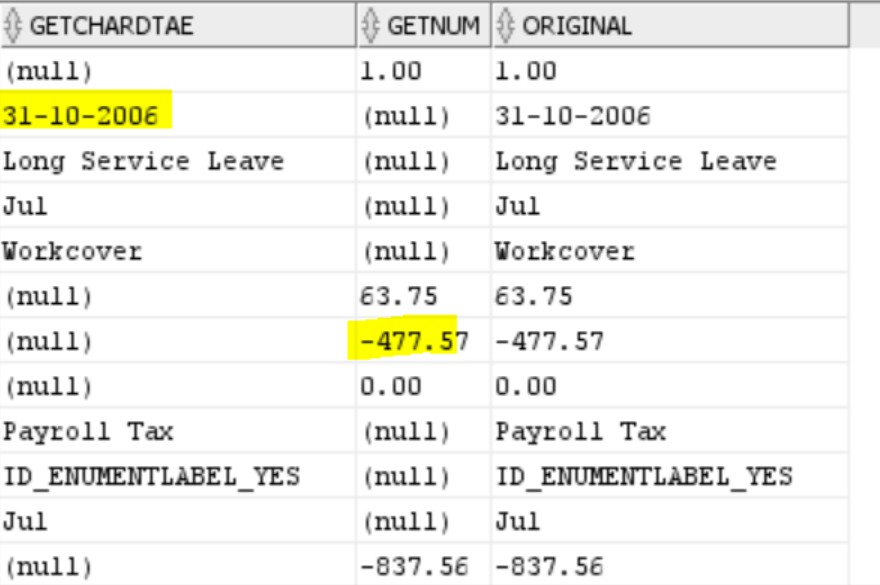
get/extract char , date , numeric values from varchar column

requirement:

amount column having numeric data , char data and date also

So char /date data into one column and numeric (+ve, -ve ) values in another column

use below query to acheive that:

select

case when  trim(TRANSLATE(replace(substr(amount_in_char,0,1),'-','')||substr(amount_in_char,2), '0123456789,.', ' ')) is not null 

then amount_in_char end getchardtae,

case  when trim(TRANSLATE(replace(substr(amount_in_char,0,1),'-','')||substr(amount_in_char,2), '0123456789,.', ' ')) is  null 

then amount_in_char end getnum,

amount_in_char original from w_plan_fs; 


Tuesday, 19 April 2022

Find out the long running queries/locked objects in database

 Use below queries

check the odi session id status in database


Example:

 select * from GV$SESSION WHERE ACTION LIKE '%21622%'; (odi session id)

SELECT * FROM V$SESSION_LONGOPS WHERE SID=1392;

SELECT * FROM V$SESSION WHERE SEQ#='9383';ACTION LIKE '%21622%';

SELECT SQL_FULLTEXT ,LOCKED_TOTAL,SQL_ID FROM GV$SQL WHERE SQL_ID='383g771j';

SELECT * FROM GV$SQL;

alter system kill session '648,51886' IMMEDIATE

select username, status from v$session where SID=12;

Friday, 11 March 2022

employee-manager relationship hierarchy using SQL Query


As you can see, I had to put a hardcoded value for EMPLEVEL field in the Recursive section of the query above. This was because I did not join the Recursive section of the query with our recursive CTE. Now, in order to make the entire hierarchical query work with actual hierarchical level of records assigned, we need to complete the INNER JOIN as in the below query. Notice the difference in value of EMPLEVEL field. This is the complete hierarchical query in CTE format. Please note that ORDER BY is optional here.

WITH OURCTE (EMPNO, ENAME, MGR, EMPLEVEL)
AS (SELECT EMPNO, ENAME, MGR, 1 EMPLEVEL ---Initial Subquery
FROM Emp
WHERE MGR IS NULL
UNION ALL
SELECT E.EMPNO, E.ENAME, E.MGR, CTE.EMPLEVEL + 1 ---Recursive Subquery
FROM EMP E
INNER JOIN OURCTE CTE ON E.MGR = CTE.EMPNO –Inner Join
WHERE E.MGR IS NOT NULL)
SELECT *
FROM OURCTE
ORDER BY EMPLEVEL;

If you need to display the manager name next to the manager ID, refer to the following query:

SELECT CTE.EMPNO, CTE.ENAME, CTE.MGR, E.ENAME “MGR NAME”, CTE.EMPLEVEL
FROM (
WITH OURCTE (EMPNO, ENAME, MGR, EMPLEVEL)
AS (SELECT EMPNO, ENAME, MGR, 1 EMPLEVEL –Initial Subquery
FROM Emp
WHERE MGR IS NULL
UNION ALL
SELECT E.EMPNO, E.ENAME, E.MGR, CTE.EMPLEVEL + 1 –Recursive Subquery
FROM EMP E
INNER JOIN OURCTE CTE ON E.MGR = CTE.EMPNO
WHERE E.MGR IS NOT NULL)
SELECT *
FROM OURCTE
ORDER BY EMPLEVEL) CTE
LEFT OUTER JOIN EMP E ON CTE.MGR = E.EMPNO
ORDER BY CTE.EMPLEVEL,E.ENAME; 

Thursday, 9 December 2021

BICC PVO job issues in ODI 12c


#ERROR1:

Caused By: javax.script.ScriptException: javax.script.ScriptException: java.lang.InterruptedException: sleep interrupted


Solution:

BICC extract script failing in the timespane

Go to mapping and select LKM LKM BICC ADW Extrernal table-- BICC job timeout- 4000 or 1000 or 0


#ERROR2:

ODI-1228: Task Merge rows-IKM Oracle Merge-Load TGT_FSCMTOPMODELAM_FINVRMRRSHAREDPUBLICMODELAM_PERFOBLIGATIONLINDISTSPVO_1 fails on the target connection .

Caused By: java.sql.SQLException: ORA-30926: unable to get a stable set of rows in the source tables


Solution:

use ikm oracle incremental update merge instead of ikm oracle merge

Check primary key enabled in mapping .

If same data trying to insert /update on target table  which is already exist in target table then it will not allow to update or insert using merge

delete data from target or source based on requirement

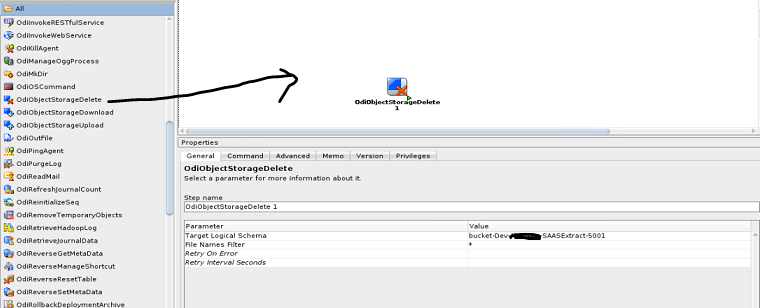
Delete files from object storage in odi package

 Delete files from object storage using odi object


configure oracle object storage technology in topology 

create package

drag the OdiObjectStorageDelete object

add details for target logical schema, filter file names 

save and execute


BICC Reset to Full Extract by Offering ID using groovy script

 BICC Reset to Full Extract by Offering ID using groovy script

ODI procedure: 

import oracle.odi.core.OdiInstance

import java.sql.Connection

import java.sql.Statement

import java.sql.ResultSet

import groovy.json.*

import java.net.URL

import java.net.HttpURLConnection

import org.apache.http.HttpEntity;

import org.apache.http.HttpResponse;

import org.apache.http.StatusLine;

import org.apache.http.HttpHost;

import org.apache.http.client.CredentialsProvider;

import org.apache.http.client.methods.HttpPost;

import org.apache.http.auth.Credentials;

import org.apache.http.auth.UsernamePasswordCredentials;

import org.apache.http.auth.AuthScope;

import org.apache.http.impl.client.BasicCredentialsProvider;

import org.apache.http.impl.client.CloseableHttpClient;

import org.apache.http.impl.client.HttpClientBuilder;

import org.apache.http.entity.ByteArrayEntity;

import org.apache.http.entity.ContentType;

import org.apache.http.util.EntityUtils;

import javax.xml.stream.XMLInputFactory;

import javax.xml.stream.XMLStreamConstants;

import javax.xml.stream.XMLStreamReader;


// Enter username, pwd

username="XX_SVC_BICC"

//password="************"

//password="<@=odiRef.getInfo ("BICC_CRM")@>"

password = "<@=odiRef.getDataServerInfo("BICC_PASSWORD", "BICC_CRM") @>"

// Create Connection object to the schema

Connection con = odiRef.getJDBCConnectionFromLSchema( "<%=odiRef.getOption("DB_SCHEMA")%>", "<%=odiRef.getOption("ODI_CONTEXT")%>" )

// Create SQL Statement

Statement stmt = con.createStatement()


// Credentials for basic authorization need to be passed through as username:pwd

userCredentials = username + ":" + password;

// Basic authorization is set up, but the encoding for credentials need to be changed.

basicAuth = 'Basic '+javax.xml.bind.DatatypeConverter.printBase64Binary(userCredentials.getBytes())


// Get the Encoding

String encoding = Base64.getEncoder().encodeToString(userCredentials.getBytes("utf-8"))


sql = "select distinct OFFERING_ID from " + "<%=odiRef.getOption("DB_SCHEMA")%>" + "." + "<%=odiRef.getOption("BICC_OFFERING_DATASTORE_TABLE")%>" 


try {

  ResultSet rs = stmt.executeQuery( sql )

  while (rs.next()) {

    println('--------------------------------------------------------------------')

    println('Reset to Full Extract for Offering: ' + rs.getString("OFFERING_ID"))


    address = "https://ea-" + "<%=odiRef.getOption("BICC_INSTANCE")%>" + ".fa.us2.oraclecloud.com/biacm/rest/meta/offerings/"+ rs.getString("OFFERING_ID") +"/actions/resetToFull"

    println(address)

    urlInfo = address.toURL()                                            // Variable converted to URL


    connection = urlInfo.openConnection()


    connection.setRequestMethod("POST")

    connection.setRequestProperty("Accept", "application/json")

    connection.setRequestProperty("Content-Type", "application/json")    

    connection.setDoInput(true)

    connection.setDoOutput(true)

    connection.setRequestProperty("Content-Length", encoding.length().toString())    

    connection.setRequestProperty("Authorization", 'Basic '+encoding)


    DataOutputStream writer = new DataOutputStream(connection.getOutputStream())

    writer.writeBytes("REPLACE ME WITH DATA TO BE WRITTEN")

    writer.flush()

    println "Connection Class: " + connection.class

    int respCode = connection.getResponseCode()

    println "Response Code/Message: " + respCode

    connection.disconnect()

  }

} finally {

  if (stmt != null) { stmt.closeOnCompletion() }

}


End-to-End Databricks S3 Workflow: Connect, Create Tables, Archive, and Move Files

End-to-End Databricks S3 Workflow: Connect, Create Tables, Archive, and Move Files Introduction An end-to-end Databricks S3 pipeline ofte...